
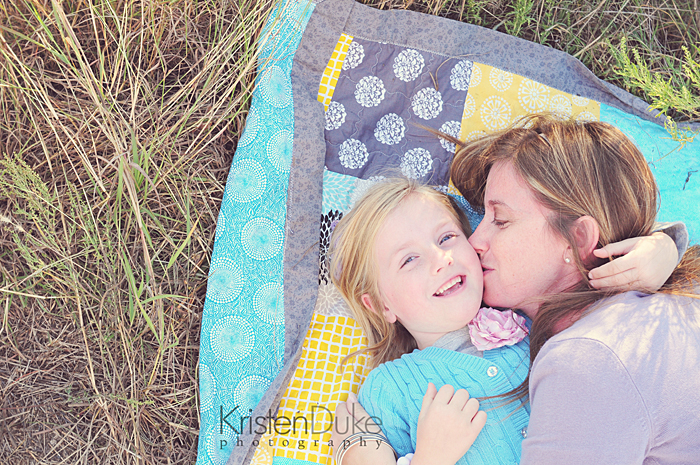
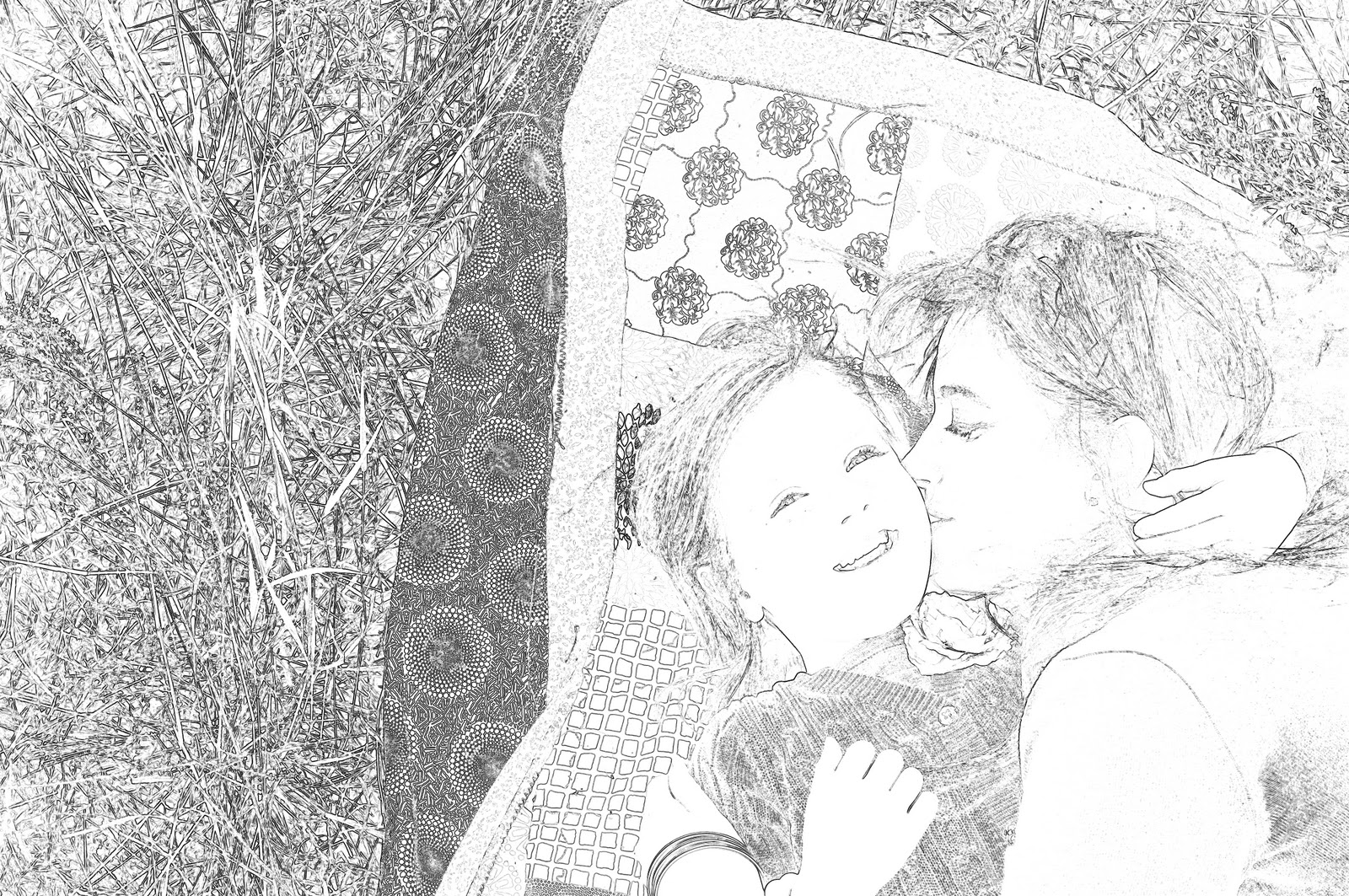
My daughter is LOVING this! She loves to color and she loves pictures of herself our family, so this is a great combo. This sketch is a photoshop technique, so sorry if you don’t have photoshop (I have heard picnik can do this). Should work on even the most basic photoshop version.
Pull up your image in photoshop, then go to Filter–Sketch–Photocopy and adjust the detail and darkness settings. Keep the detail setting as low as possible while keeping the outlines of the image. The detail here is at 8 and the darkness at 5. The darkness setting needs to be dark enough to see the outlines you want to keep.
Clean up image by adjusting the levels. Go to Layers–New Adjustment Layer–Levels and increase the shadow levels (first arrow) until you are happy with the darkness of the lines. Then decrease the highlight levels (second arrow) to clean up the white areas of the picture. Print it out in black and white and voila!









Oh my WORD, I need this book! :D
Oh I would LOVE to win this book! And loving the idea of turning pictures into coloring pages. My daughter would LOVE that!!
[email protected]
I would love to win this book.. I am very grateful for all the very nice ideas you give us..
I have just tried the transformation of a picture for our home calendar and it really looks great! :)
Pretty please pick me! I would love to win. Thanks so much for all your great ideas!!!
I would love to win this book! And what a fun idea to turn photos into coloring pages.
I would love to win this! Awesome!
I SO need this! Pick me!
I really want this book. I am so sick of having a nice camera and not knowing how to use it.
We are purchasing a camera right now! I want this book so badly!
[email protected]
I look forward to Kristen's posts every week! I am an aspiring photographer and your posts are oh-SO-helpful. I would LOVE to have a copy of this book!
That book would be very helpful!!
Ok, I SO need this help! :)
Oh how I would LOVE this book!!
I am SLOWLY learning how to shoot on manual! The pics are SO much better! But I find myself getting frustrated because I don't know what I am doing so I go back to auto!
Love the book! Thanks for the great ideas!
Oh I would love this!!!
This would be perfect for me since I have started my super secret camera stash so I can buy my dslr this summer!
I would love this book! Thanks for the chance!
I want to start by saying I LOVE your blog….I read it every day!
I would LOVE to win this book. I have a SLR, but I'm new at it and I'm always asking my friend for help on which settings to use and when.
i really need to get out of auto! what a fun giveaway:)
I <3 the coloring book idea!
We use Adobe whatever to edit photos. My hubby does that usually, but I am pretty sure I've "sketch" mode on there somewhere.
He got me a digital camera for Christmas because I was complaining about using my camera phone (which takes decent photos). And he, knowing a thing or two about photography, told me, the beginner, to put it on auto. I will have to buy this book if I don't win it!
Thanks for the opportunity!
I would LOVE, LOVE, LOVE to win this book. Thanks for the great ideas!
I would love to win this book, thanks for the giveaway!
I totally need this book! I play around with the manual settings but really have no idea what I'm doing!
Love it! Sound practical and inspiring. So enjoy your posts!
Sign me up! Great giveaway!
That book would be just what I need to say PEACE OUT to auto!
I just got my first "Professional grade" DSLR (Cannon 5D) and I REALLY need this book! Please pick me!
This could be the answer I have been looking for in order to understand my camera and shoot better photos….please pick me!
I would love a copy of this book. I love reading all of your great photography tips and ideas!
I wanna win!!! :D
I love the idea of this book! And let me tell you I NEED IT! :)
i would love your book – i already enjoy all your tips so to have them in a book would be great
I could use the help…please.
cool giveaway!!! I love all your ideas.
I would love this book! I've been randomly checking out books at the library trying to teach myself…but I just don't know where to get started. This would be a huge help!
Awesome book! And great idea turning pictures into coloring pages!
I could really use help getting out of auto mode.
I would love a book too! And thank you for all the helpful tips you have posted on this blog!
Pick me! Pick me! I really need to take the time to learn how to really use my camera and get out of using auto mode all of the time. Thankss!
What a great idea! And I could SO use that book. I need to get out of auto mode!
What an incredible prize! Thank you for your inspiration and hard work!
That would be an awesome prize!
This would be so helpful – I'm in the process of learning to say NO to auto!! Thanks so much!
shelpowl(at)telus(dot)net
I would love to be able to learn some things to help me capture my boys in photos I would be proud to put on my wall.
We were going to buy a camera for us for Christmas, but what held me back is not knowing how I am going to use it. And no photoshop on the cumputor and a messed up printer/copier.
Thanks for the chance.
Awesome! I would love to win!
sounds like a book i need!!
Ummm…yes, please!!! This is just what I need!
I always benefit from your wisdom! Would love the book!
I SO need that book! I have an awesome camera, gorgeous people and scenery to photograph…and no clue as to how.
PLEASE pick me, lol!!
*smiles*
debbi
I would love this book! :)
I need this book! I definitely need some guidance switching to auto!
Ohhhhh My goodness, I so need this book, ReAlLy!!!!!!!! My Dear Hubby is about to purchase me a really nice camera that I have always wanted right before he leaves for Iraq next week, and I so could use this!!!!! Turning pictures into coloring pages would be something our daughters would go crazy about!!!!!!!
Michelle Torres
[email protected]
I bought my dream SLR camera last year and have yet to figure out how to use it because it is way too fancy. I need this book!! LOL!
Meg
[email protected]
Just got a DSLR for christmas and I am learning how to use it… i would LOVE to win! :)
I would seriously love this book. You inspire me!
I would love to win this book! I love quick and easy tutorials!
I would love to have the book. YEAH!!!
I would LOVE this book! I am trying to improve on my skills while my kids are still young!
I would love to win this book! I have learned so much from you already and would love to learn more!
I would love to win – its been too long since my last photo class and I have a new camera and haven't made myself sit down and play around with settings again…
Oh, man…I would LOVE to win this book! I love reading Kristen's photo tips!
Thanks for the great idea about turning images to coloring pages – my kids will *love* this. I would love to win this e-book, perfect size to take with everywhere and would be oh so handy for quick reference.
I just bought it, but maybe I will win:)
love the coloring book idea. I have always been afraid to take pictures because I didn't know what to do with them once I did. I am looking forward to learning more about my camera. I would love to win your book.
I have been looking for a good book on photo tips, this looks perfect!
OOOOOhhhhhhh! I could really use a book like that! Fingers crossed :)
What a great give away, I totally want/need this book!!
Just got a DSLR for Christmas and only know how to use it on Auto..this would help a lot!
I really want that book. I need all the help I can get.
This book has my name ALL OVER IT!
I have been taking lack-luster photos with my DSLR for sooo long! This would be the perfect intervention!
[email protected]
I SO need this book…(just like everyone else I am sure) I am excited to go make some coloring pages for my kiddos…maybe this will help them be "quiet" in church now…thats a BIG maybe:) but I am excited-THANKS for the giveaway chance-LOVE following your blog!
Count me in for this giveaway! I'd love to win;)
I would love to win this book!
Sounds like just what I need. I love the look of this book, too. Very fun. Have fun in D.C. My family is relocating out that way this summer.
Oh, I would love a copy of the book. I'd like to finally get out of auto shooting.
I SO need a copy!
I would love to win this book!! You give great advice and want more. :-)
lee_donna6802 at yahoo dot com
I would love a copy! Fingers crossed!!
I don't have a dslr but I want to learn how to use my finepix s700 on manual mode. So I could really use this book! Thanks for the opportunity!
Me would like copy of book. =-)
I would LOVE this book!! I have hand-written notes from your posts that I keep in my camera bag. This would be fantastic to win!
I would love to learn how to use my camera; off the 'easy' button!
I am so excited about this book! I hope win. Thanks again Kristen and Amy!
I would love this book! I have got to stop using auto, this would sure be handy. Thanks for sharing!
I would love to know how to use more then auto on my new fancy camera!! I need this book!!
I need this book. I've had a hard time switching to my dsl camera
We just bought a new camera last week and I really NEED to learn how to use all those buttons!
brettaneynquinton (at) gmail (dot) com
Love the title!
What a great giveaway! Thanks for all your great posts!
What an awesome idea!!!
The book would be so awesome to have! I just started experimenting with white balance. I don't have photoshop on my PC but I do have the app on my phone. It works just as you explained. Neat idea!
I need this book so badly, I have a beautiful camera but am scared to really use it as it's intended! HELP!
I would love to have this book! I love reading your blog, and all of your "visits" to the Idea Room. I love your photography – and am hoping to increase my photography skills!
I bought your ebook last night but I'd love to win a copy!
I really need this book. I am trying to convince the hubby I need it. If I win it, then it would solve the whole problem.
sounds like so much fun. i would love to win!
I could so use this book!
Kristin, you advice and information has been very valuable. I can't imagine how much for help I would receive were I to be the lucky winner of your book. Thanks for helping us.
You can never learn too much… I would love to learn more from this little book.
I would LOVE to win this book! What a great idea for a giveaway!
Love love love this book! :)
I would love this book.
I soooo need to say no to Auto!! I've played around with manual but it just doesn't turn out right. I would love to win this book! I'm sure it would become my bedside reading:) And I love the idea to turn your photos into coloring pages. Super cute!
WOW! I need this book in the worst way! I've always been inspired by the ideas posted on this blog! My camera deserves to be used like it should be! haha
This book would be awesome! I'm still trying to figure out my new camera, haha :)I desperately want to move away from the AUTO button ;)
Would love your book!!
VERY COOL., have to purchase it if I don't win!
what a great little book! i would love to win it. i have no desire to be a pro photographer (love it as a hobby though) but ALWAYS want to learn how to use my camera better.
This book would be so helpful! I am always deleting photos because I don't know how to take a proper picture.
I would love this book! I've been wanting to learn more about saying "no" but am just a little intimidated. Especially by the daunting users manual with the camera. Hopefully the book is easy to read!
I am guilty, guilty, guilty of using the auto mode. I really want to learn more about our camera, but don't know where to start. I'd love to win this book to kick things off!
This book sounds ideal for us—we have a Nikon and are trying to learn more about how to take better pictures to really use the functions of the camera. Thanks for the opportunity to win!
I am loving all the photography helps you have given. The book would be awesome. Thanks for all your generous tips!
I just got a dslr for Christmas and could REALLY use the help. Thanks for the chance to win!
I NEED this book :) I have had my new camera for over a year and I can not seem to get out of the auto mode :( This camera seems like such a learning curve and my husband is frustrated that I bought it and cant get the ics to come out correctly, lol.
This would be awesome!!! Thanks for a chancce to win
YAY Kristen! You're so fun. I would love to have your book :)
My camera would love me to have that book so it can live up to it's full potential!
NEED NEED NEED this book! Thanks for sharing all of your great ideas and tips!
NEED NEED NEED this book! Thanks so much for all of your great tips and ideas!
This sounds like a great resource..I need help using the DSLR – Quick, before my kids grow up! =D
This sounds like a great resource..I need help using the DSLR – Quick, before my kids grow up! =D
This clueless photographer would love to win your book. You are so creative and your site is truly enjoyable!
I NEED this book – I am one of those who has a nice camera and doesn't know how to use it. I am crossing my fingers that I get lucky enough to win!
I got my first dslr camera from my hubby for Christmas this year and have spent the past month playing, watching videos, reading, signing up for a class and whatever else I can think of to learn the best ways to use it. This book would be perfect for me right now!
~Morgan
[email protected]
Wow I would love this! I'm a slave to auto!
juliaguinter{at}hotmail{dot}com
mmm hmm I would love to learn more!
I would LOVE this book!
I would love to say NO – if I knew how…hope I win so I will learn to say NO!
I soooo need to learn how to use my camera properly! I want to say NO to auto mode!!!
Marciprinz @ gmail dot com
I totally want this book…. to go with the dslr I totally want. :) Actually, my point and shoot has manual options, and my dad would be so proud if I started using them. :)
I would love this book. I have always wanted to learn more about my camera, but needed someone to spell it out for me! :) [email protected]
I have a decent camera and four great subjects but auto mode is where my dial stays. Help me!! :)
that's a fantastic giveaway. I'd love a copy!
Pick me, pick me! :)
[email protected]
I'd love a copy of this book! I'm always so afraid of getting poor quality photos when shooting on anything other than "auto" or "program" modes!
That book is exactly what I need.
Awesome! would love this book.
eric_danielle@netzero dot com
I took a class on how to use my camera and still shoot in auto! I want to learn more
Love it! Hope I win!
ashlanengaATgmailDOTcom
Thanks!
amo72 at ymail dot com
Oh please, please! I need this book! :)
awesome. i soooo need this
mychancetowin at gmail dot com
I would love this book!! oh and I need this book!! :)
I would love to have this book!
I love that idea! Very fun. I would also LOVe to win that little book you have made!
I really want to take better pics of my kids.
Would love to win this!!!
I really need the book. I've been using my DSLR camera like a point and shoot all this time! But what I really wanted to say was that I think the photo–>coloring book idea is really fantastic.
I need this book too! I want to say NO to automode….right now!
i would love to win. My husband got me a new slr camera and I would love to read the book so I can stop using the AUTO mode.
Jenn
[email protected]
I love Kristen's Tips and would love to win this book!
A great book and it looks darling also! I can't wait to get my hands on it!!!
ME! Pick Me!
OOOOOHHHHHHH….no more auto mode?! It's a bit intimidating…..!
I am always wanting to learn more!
cheryl2mgibson(at)yahoo(dot)com
I want to say NO to auto!!!! I want this book PLEASE
I have no idea how to use our camera other than on auto! This would be great!
I need this!!! I only use the auto mode on mine :(
Oh how nice it would be to understand my camera.
Wow! I'm usually a day late and a dollar short! Can't believe I stumbled upon this before the deadline. I would LOVE TO LEARN from your book and say good-bye to auto mode!
I would love, love, love this!!!
Ohh Ohh Ohh Pick Me Pick Me! :o)
Love your photos and thanks for the chance of winning a book!
hotmailnell(at)yahoo(dot)com
Great book! Would love to win this and learn so much more! Love reading your blog, keep it up! :) Thanks!
I really need this to teach me some new tricks!
This is definitely a book I need, as unfortunately I use the "auto" setting WAY too often!
Would love this book! Just got a dslr for Christmas and am trying to stay away from auto!!
I am just learning to use my dSLR, and need so much help!! Thanks for the chance to win it!
[email protected]
PICK ME! PICK ME!
Yes Yes Yes!!! I would love this book.
Love the coloring page idea- there is an online photo editing site called picnik that has that option. I used a picture of my daughter for a color at home birthday invitation.
So excited! I would love this book!
Me too! Me too! I just got a new camera and can't wait to learn what it can REALLY do!
I absolutely need this book! I only take photos on auto and I know my camera is capable of so much more! Thanks for the opportunity to win!
PICK ME PLEASE :)
Julie Ann
j.a.c @ aggiemail.usu.edu
Your blog has been my go-to source for understanding how to use my camera. I would love to continue my education with your book! :)
I want the book. Please pick me!
I would love to learn more about taking pictures.
i'd love this. i'm about to upgrade to a dslr and this book would so help me with that upgrade!
I would love this book. I'm a yearbook advisor, as well as a photography mommy!
please please please please let me win!! :]
How perfect for me! Just got a DSLR at work and have no idea what to do with it!
The title of the book makes me laugh because I'm guilty of setting mine to auto. I really would love to learn more about it!
I SOOOOO need this book! Hope I win!
Your book looks awesome – I so want to say no to auto but I admit it… I'm scared!
Love the idea of turning a photo into a coloring page – will have to try this. Think it will work in PSE? I am still learning elements.
I will be making coloring pages for my daughter. She will love them. I would love to win the book. I have been trying to learn manual for a long time.
This book is the exact thing that I need/want. Thanks for your inspiring work!
Cutest little book, and even better that it's filled with great info! :D
Thank you so much for all your tips and insight!
oh very cool giveaway!
Hope I win! I love following your blog!!! Great work and ideas!
I'd love to win….I haven't had my camera out of auto in years. Shame on me. But it gives me panic!
Pick Me! Pick Me!!
chickenfilet55(At)hotmail(dot)com
I really need this book. I'm constantly going back to re-read your awesome tips.
I need this book too. I've had my Canon for 4 years and haven't used it much at all. I'm just so intimidated by it. I just grab the one that's easier for me to use;)
Oooh! Pick me! I need camera help! Preferable before #3 arrives this summer…
I could really test your teachings. I am guilty of using auto exclusively but would like to learn to be in control of my photos.
Wow, learn how to use my camera? Maybe somthing to help me to remember to bring it too. I need this.
Kellie
Thank you for the wonderful posts, Kristen…I'm getting more and better coaching for my dslr than I've ever gotten in my life!
[email protected]
What a great book – would love to get my hands on it!!
My little mommy brain so needs this book. I am trying really hard to get out of shooting auto. Today I researched how my settings should be for snow pictures while the kiddos waited impatiently to go play in the snow. Thank you for such a wonderful giveaway!
Lots of time on my hands and would LOVE to learn more about our dslr!
No really! Pick me. Please? Pretty please?
Oh Boy! I am so in need of camera help! I'd love this book! Thanks!!
Way cool. I need this.
I need this!!
[email protected]
I would LOVE to win this! I want to stop shooting in auto but am intimidated by shooting in manual. This would be a huge help!
I would love this! THank you for all of the great tips!
Would love to have this book!!! Just got a new camera…
How fun! I'm pretty good in Manual and AV but it wouldn't hurt to keep this in my bag with me! Thanks for all your tips!
Pick me! Pick me! I really want to take better pictures!
I would love to win this book! So please pick me! And those pictures to color are so cute! [email protected]
Not only would I love to read this book, but I NEED to read it. Pick me!
Ooooooo….I NEED this book. Thanks for the opportunity!
I want this book. It would then give me an excuse to buy a new camera :)
This is my new years resoloution!! I could REALLY use your help!
[email protected]
AWESOME idea!!! My little boy would love that! I don't have photoshop… wish I did! BUT.. picnik.com had a pencil sketch option in their effects!!! It's free and I just made about 5 for my little one!! Thanks for the idea!!
Need this book to help me out!!!
[email protected]
Just what I need! and love the coloring page idea- great idea for valentines gifts for my 4 girls!
Great idea and thanks for sharing! I'd love the book!
I make these for my kids at school all the time. Nothing makes them more excited to get to color the pictures I snap at them.
P.S. If I happen by some off chance to win the book, please pass it on to someone else.
P.P.S. Kristen is so right, get out of auto mode if you own a DSLR!!
I would LOVE to win this book! I have been thinking a LOT lately about learning to use all the fancy settings on my fancy camera! Thanks for the opportunity to win it.
I just got a new camera for my birthday and I am so lost…
[email protected]
Just got a DSLR for Christmas and I need that book!
I NEED THIS BOOK. PLEASE LET ME WIN!
I would read it cover to cover!
I would love, love, love to win Kristen's new book!
Wow this is such a great idea! Thanks for sharing… I am officially a follower, cant wait to see what you do next!
What a great book! I could totally use it! :)
SUCH a cute idea! How unique :)
Sarah aka Miss Candiquik
Oh I would LOVE this. I have been taking notes with every Kristen post, and would just love a little help book from her.
Count me in!
I just bought my first SLR and this book would be awesome to have!
[email protected]
love this!
I could really use this book!
paige at marston dot ws
I enjoy the tips you share SO much!
Would love this little gem!
sI totally need help in that department… I took a photo class long ago but have been a mommy ever since and have sadly lost all that knowledge.
I would LOVE to say NO! to auto mode. Thanks for the giveaway!
Great giveaway! I would love to win this book!
http://www.annesvinyl.blogspot.com
[email protected]
What a fabulous sounding book. I would adore it and being able to learn how to use my new camera! I Love the tutorial. So much fun. I think I know what I will be trying at nap time tomorrow!
What a wonderful book! count me in!
Win it or purchase it. . . one way or another I will get this book!
I would love to win this book and if I don't I guess I'll just have to buy the e-book. ;) I've learned a ton from your posts here and am sure I could learn tons more from your book.
I would love to win this book. I'm obsessed right now with learning to take better pictures!
I so need this book. Really trying to leave my flash off but sometimes I cave in with frustration!
I would love to win this
LOVE it!!
I would love to win this book! I have a new camera and would love to get away from using auto all the time!
One of my new years resolutions is to become more proficient in my photography.
I'd LOVE this book!
huffalupagus at aol dot com
Wow! I'd love to win this book. I've had my SLR for over a year now, and still haven't figured it out yet lol.
Still struggling with my DSLR. I so want to be able to snap fabulous pictures without the auto setting. I just can't seem to find easy to understand tutorials.
Oh, pick me! Pick me! I really need some help!
Pick me! Pick me!
I would love to win this! Your book looks awesome!
Lanni
Please let the random picker fall on my name! :) Can't wait to see all your great tips and suggestions in this book! I've attempted M but still don't feel comfortable with it.
I would love to win the book. I am constantly learning what to do and what not ot do with my camera!
Oh please let me win!! Ever since my son was born I have been just aching to learn about photography–and that was two years ago!
I would love to win this!!!!
Would love this book – I've taken camera classes before and still don't get it!
Kristen, I really want to be like you when I grow up- so I NEED your book… only thing is I am sure I'm older than you :)
I'd love this book – I've taken classes for the camera before and still don't get it.
How awesome would this be?!
[email protected]
Would love to have this. I can always use some help when it comes to taking pictures!
I have bookmarked all of your photography tutorials and have learned SO much for you. I would love to have this book w/ me at all times!
[email protected]
sitting in school desk…. hand raised…. hoping up and down "ooooh!! oooooh! ME! ME! PLEASEEEEE teacher…. pick ME!!!!"
mom of 4 (ages 7boy, twins 4girls, and baby 21M girl) I LOVE photography and always have. I have never been able to afford a FANCY camera. I do have a digital, but lens does not come off. I use the auto A LOT because the manual is not written in a way "normal" people can understand. Thanks for your consideration. Stacey
I would love one of these. I looks like the perfect for throw in your camera bag.
[email protected]
I love your blog. Thank you for your creative and affordable ideas. Love your style!
I would love this too! Just got my camera for Christmas so I still have lots to learn.
Cool — sounds like a great tool for someone like me who is still learning the ins-and-outs of my camera. :)
CArmen.
I would love a copy of this book! I have to admit… love taking photos and am still using my trusty film camera. I am terrible at getting digital photos to come out right, maybe all the info in this book would help me actually get the shot I want, not just a blur!
I would love to win this. I am using my auto mode right now and itching to really learn my camera!
I would love this book!! I have been trying to get away from the AUTO on my camera for a while now!!!
So fun!!! We just bought a nice camera, but I don't know anything about it :)
What a wonderful giveaway. I would LOVE to win this book!
I would love this book! Auto is such a crutch for me :/ Here's to even better photography!
Oh, how I need this book! I have had my DSLR for YEARS and have NEVER used it on manual. Too intimidating! :)
I would love to take my camera off auto
sarademay at cox dot net
Pick me! I would love this book!
My hubby would love for me to have this book. Always reminding me there is more to my camera!
I SOOOO bad want this!! Great giveaway!
Would love love love to win! Thanks for sharing your talent!
[email protected]
I would love that book! Pick me! PLEASE!!
I would love this book!!
I would love to win this book! You have the best ideas!
I would love to win!
Pick me! I really want to learn to not use manual mode, but I am not sure how to make the jump!
[email protected]
I would LOVE to win your book! You have such a great way of teaching and wording everything so even I can understand!!!
what a great giveaway, thank you!